Introduction
The pinhole camera model is a mathematical representation of a physical pinhole camera. In the context of computer vision, the pinhole model allows us to formulate the process of transforming points from 3D world-space to digital 2D image-space.
Coordinate systems
There are four coordinate systems that we need to consider when talking about the pinhole camera model.
- World
- The real world coordinates of the points we're projecting
- Camera
- The coordinates in from the perspective of the camera
- Image
- The coordinates of the plane onto which the 3D points are projected. In a digital camera, it's the physical sensor.
- Pixel
- The coordinates in pixels on the produced digital image
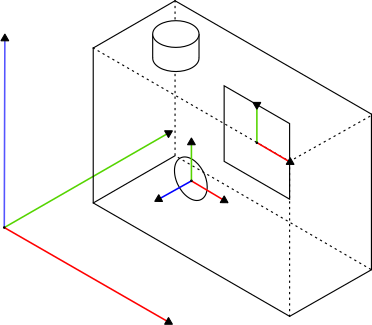
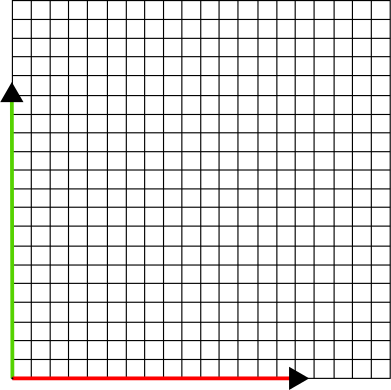
FIGURE 1: Coordinate systems
In order to be able to project any 3D point in a real world to a 2D digital image, we can follow the following transformation:
World
Camera
Image
Pixel
FIGURE 2: 3D point to 2D digital space transformation
Doing so for every point of a real-world object will create a digital image of the object.
Model Visualization
The pinhole model can be formally visualized in the following manner:
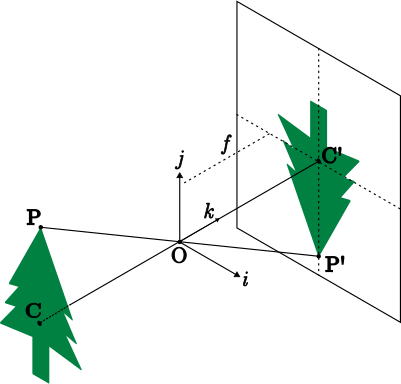
FIGURE 3: The pinhole camera model
- is a singular point taken as an example.
- is the center of the camera (the pinhole).
- is the projection of the pinhole () onto the image plane.
- is the point projected onto the image plane.
- are the three dimensions.
You can kind of visualize this model in the real world like this (note that the pinhole should actually be infinitely small, not a large circle):
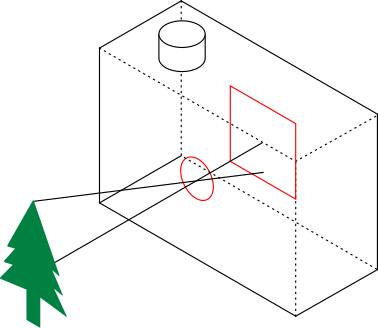
FIGURE 4: Real-world visualization
of the pinhole camera model
Camera → Image
We are here
World
Camera
Image
Pixel
What we want to figure out is how to convert a point in the camera-space to a point in the image space . We need some function to perform this transformation:
You may notice in figure 3 that points and make similar triangles.
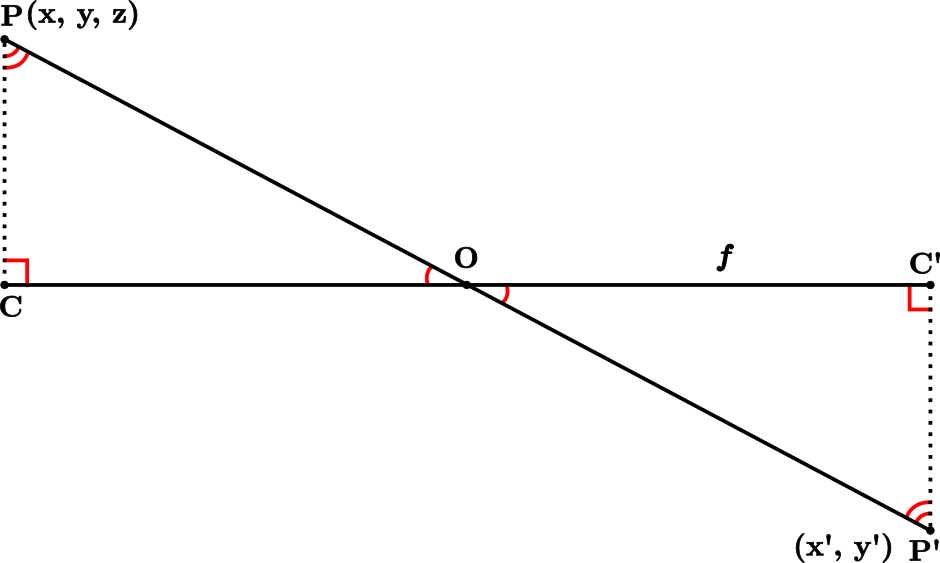
FIGURE 5: Similar triangles in
the pinhole camera model
Using the similar triangle property:
Our conversion function now becomes:
Image → Pixel
We are here
World
Camera
Image
Pixel
Now we need to convert the point from image-space to a point in digital-space.
In figure 1 we can see that the origin of the coordinate system in the image space is at the center, while in (this) pixel space coordinate system, the origin is in the bottom left corner.
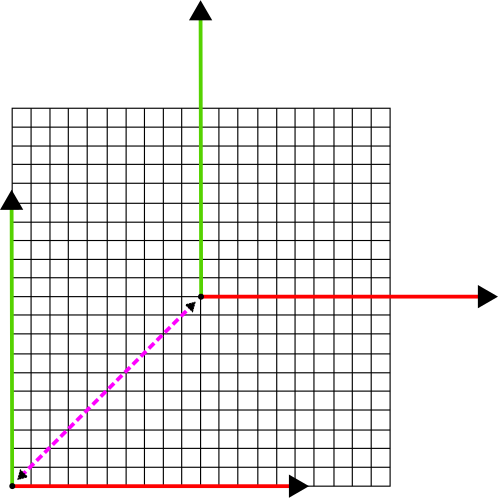
FIGURE 6: Translation between image
and pixel space coordinate systems
This offset needs to be accounted for. The translation vector can be represented as:
Adding it to our transformation function yields:
Up to now, we've been working in real-world units, like millimeters. However, since we're creating a digital image, the units should be pixels. We can change the units by creating two new variables and . These variables represent the ratio of real-world units to pixels, and their units would be similar to allowing us to cancel out the real-world units.
Adding it to our transformation function yields:
And tidying up the matrix,
Why do we have two variables for pixel/mm ratio?
Although in our daily lives we mostly encounter square pixels, that's not always the case. Having separate variables for and dimensions helps generalize the model to handle all kinds of pixel shapes.
Matrixification[2]
Scientists and computers love matrices, so it would be a good idea to represent our transformation as a matrix. If we do that, a simple matrix multiplication will yield the result.
However, there is one problem. This mapping is non-linear, meaning we cannot represent it as a matrix-vector product. To make it linear, we can make use of homogeneous coordinates.
What makes this mapping non-linear?
A mapping is linear if it satisfies the following two properties:[3]
In our case is the image space and is the digital space. Let's run the part of our mapping
Through the second property, first scaling input individually:
And then scaling the input all at once:
Since
This mapping is non-linear
We convert our coordinates to homogeneous coordinates by adding an extra dimension with a value of 1
Getting rid of the division by ,
Note that the original real-world point also becomes homogeneous,
And now we can represent the transformation of with a matrix-vector multiplication,
Which can be simplified into,
Can't I simply divide each of the values in by and avoid homogeneous coordinates?
Yes, you can. The transformation would look like this:
However, it is admittedly less "clean", and it will cause more issues down the road which will be discussed further.
World → Camera
We are here
World
Camera
Image
Pixel
So far we've been working with the camera coordinate system and the digital space coordinate system. The final step in the real-world to digital-image pipeline is to convert the real-world 3D coordinate to the camera-space.
To add intuition to this process I propose the following analogy:
Imagine you are a camera, somewhere in the real world. Your friend is standing somewhere else and points at some point telling you to take a picture. In order to get the exact shot that your friend wants, you need to move to his position and aim yourself at the point.
This is what we do here. We use a translation matrix to "move" the camera coordinate system to the real-world coordinate system origin, and the rotation matrix to "aim" at the point.
Good news is that rotation and transformation can be achieved through matrix multiplication when using homogeneous coordinates.
Transformation matrix :
Rotation matrices (one for each axis):
The rotation matrices can be combined into one general rotation matrix
Using these matrices, we can represent the conversion from the world-space coordinates to camera-space coordinates by matrix multiplication:
Putting it all together
To convert a given point in real-space to a pixel in digital-space we can perform the following chain of matrix multiplications:
Or more simply:
Notes
- This article was heavily inspired, and is a lossy compression of CS231A course notes from Standford, and CMPEN454 notes from PSU
- Pronounced with syllabification of Californication ↩
- Formal definition ↩